
What this is: how to set up a space so a virtual consult feels like a real visit, safe, private and comfortable.
Who it's for: clinic and nurse managers, Aboriginal Health Workers and Practitioners, and anyone preparing the room.
The space sets the tone
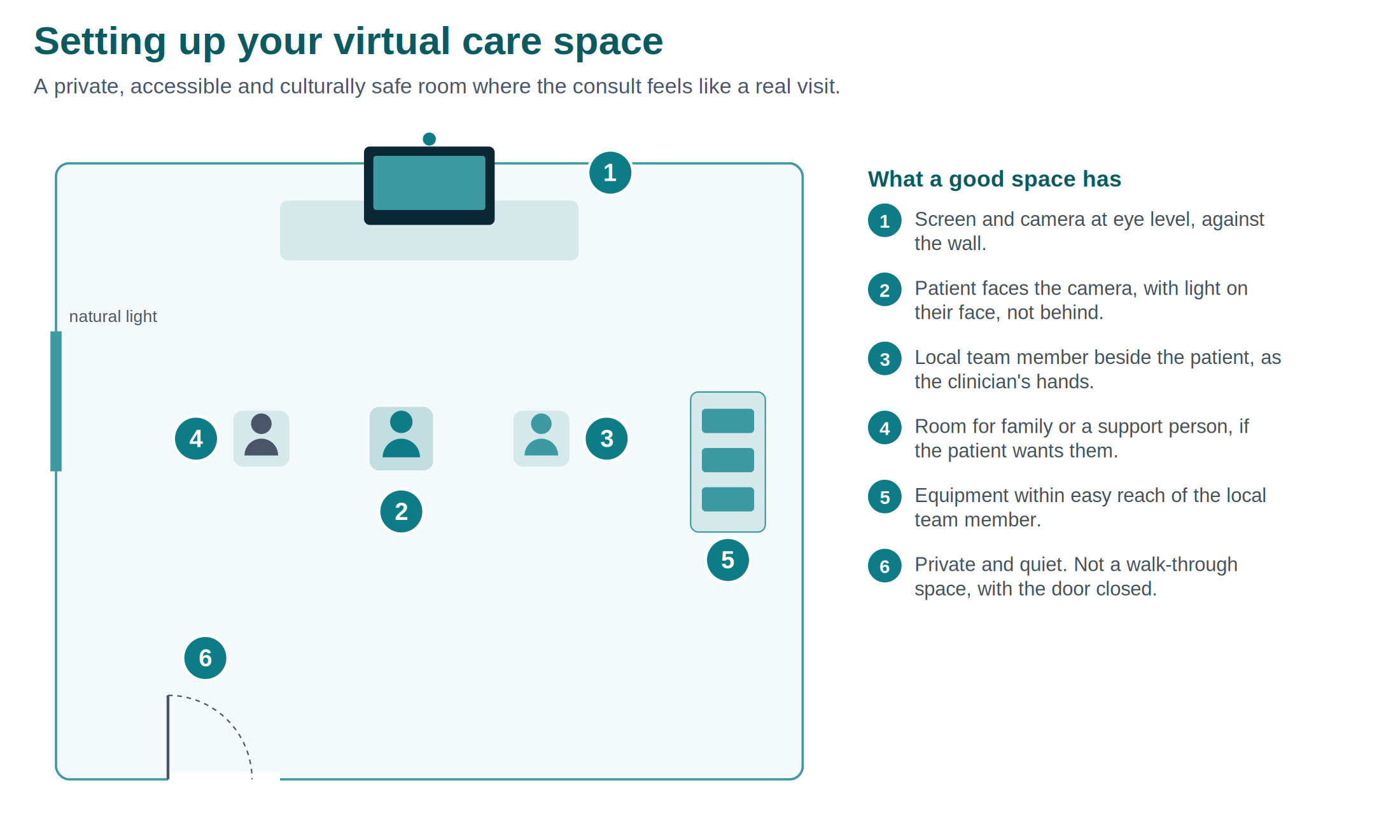
The room shapes how the consult feels. A good space is private, accessible, and culturally safe, and it puts the patient at ease. You do not need a purpose-built suite. You need a room you can make quiet, private and welcoming.
Private
- Choose a room where the consult cannot be overheard.
- Make sure it is not a walk-through space. Close the door and put a sign up if you need to.
- Position the screen so others cannot see it from the doorway.
Accessible and culturally safe
- Make sure the patient can get in and move around easily, including with a wheelchair or walking aid.
- Set the room up so it feels welcoming to the people you serve. Ask your community what would make the space feel safe.
- Leave room for a family member or support person if the patient wants someone with them.
- Seat the local team member beside the patient, not across a desk, so it feels like support rather than an interview.
Camera and screen
- Put the screen and camera at eye level, against a wall, so the patient and clinician can see each other naturally.
- Frame the camera so the clinician sees the patient and the local team member.
- Test the view before the patient comes in.
Lighting
- Light the patient's face from the front, not behind. A window or lamp behind the patient turns them into a shadow.
- Avoid glare on the screen.
Equipment within reach
- Keep the peripherals within easy reach of the local team member, so they are not leaving the patient to fetch a device.
- Have everything you need for the consult ready before the patient arrives.
Reducing interruptions
- Let the rest of the team know a consult is in progress.
- Silence or divert phones in the room.
- Plan the session so the local team member is not pulled away mid-consult.
Need help?
- Visionflex support: visionflex.com/support | support@visionflex.com | +61 2 8914 4000 (9am to 5pm AEST)
- See also: Virtual care equipment and peripherals; Before, during and after a virtual care consultation; Connectivity in remote and outreach settings
Visionflex acknowledges the Traditional Custodians of Country throughout Australia and pays respect to Elders past, present and emerging.