
What this is: a guide to using virtual emergency and after-hours pathways to get a resident seen quickly, often without a hospital trip.
Who it's for: registered nurses and clinical staff making escalation decisions.
When a resident's condition changes, the question is always the same: who do they need to see, and how fast? Virtual care adds a powerful option between "wait for the GP" and "send to hospital". A remote emergency or after-hours clinician can assess the resident on camera, often within minutes, and decide on the best course together with you.
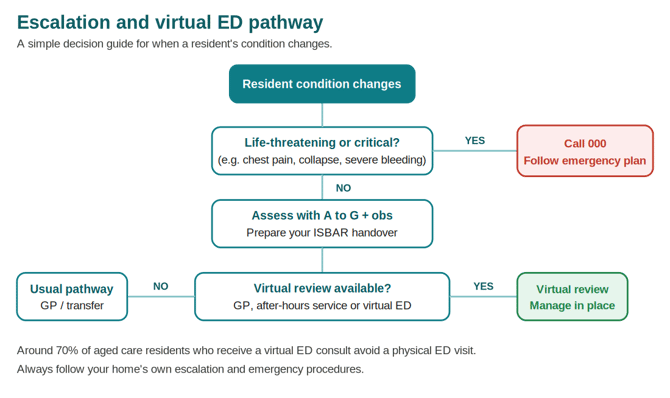
This matters because a hospital transfer is hard on an older person. It's disruptive, disorienting (especially for residents living with dementia), and frequently avoidable. Virtual emergency services exist precisely to keep residents who don't need a physical ED out of one. Around 70% of aged care residents who receive a virtual ED consultation avoid a visit to a physical emergency department.
The decision pathway
Use this as a simple guide. Your home's own escalation and emergency procedures always take precedence.
When virtual emergency care fits
Virtual emergency and after-hours review suits residents who need timely clinical assessment but are not in a life-threatening emergency. Typical examples:
- A change in condition that needs a clinician's eyes sooner than the next GP round.
- A possible infection, catheter issue, minor injury or medication concern.
- A situation where you'd otherwise consider an ambulance "just to be safe".
- After-hours deterioration when the usual GP isn't available.
When it does not fit
For life-threatening or critical emergencies, call 000 and follow your home's emergency response procedure. Virtual review is never a substitute for urgent transport when that's what the resident needs. Services like virtual ED are designed only for residents who do not require urgent transport.
How a virtual emergency consult runs
The exact service varies by state and provider, but the shape is consistent:
- You contact the service (or, in some models, are contacted after a triple-zero call is triaged).
- You provide a clinical handover. Have your ISBAR ready.
- The clinician joins by secure video on your virtual care equipment or a web-enabled device.
- You act as their hands at the bedside: observations, peripherals, positioning.
- Together you agree the plan: manage in place, arrange follow-up, or transfer if needed.
- A discharge summary is sent to the resident's GP, and a copy to the home where offered.
What good looks like
Homes that build virtual emergency pathways into everyday practice see real results. One Visionflex aged care network recorded more than 100 virtual ED escalations and avoided 60 to 80 hospital transfers across its sites, alongside fewer staff hours lost to coordinating and attending transfers. The resident stays in familiar surroundings, and the clinical decision is made faster.
Getting set up
- Confirm which virtual emergency and after-hours services operate in your state and region.
- Save the contact details and access steps somewhere visible near your equipment.
- Make sure staff across all shifts know the pathway and have practised the handover.
- Keep a backup connection ready (see the troubleshooting and setup guides).
Need help?
Visionflex support: visionflex.com/support | support@visionflex.com | +61 2 8914 4000 (9am to 5pm AEST)
See also: Before, during and after a virtual care consultation, and the ISBAR and A to G handover guide.
This is general guidance, not clinical advice. Always follow your home's escalation and emergency procedures.
Visionflex acknowledges the Traditional Custodians of Country throughout Australia and pays respect to Elders past, present and emerging.